
Using AI for online business does not have to be complicated. You do not need to understand how artificial intelligence works behind the scenes, learn dozens of AI tools, or automate your entire business.
For a complete beginner, AI can simply be an assistant.
It can help you brainstorm ideas, organize information, create first drafts, research questions, plan projects, and turn complicated tasks into smaller steps. Used correctly, AI can save time and make running an online business feel more manageable.
But AI should not make every decision for you. It can give you ideas and starting points, but you still need to review the information, make decisions, and decide what is right for your business.
The easiest way to begin is with one tool and one useful task. Once you understand how AI helps with that task, you can slowly add other uses as your business grows.
What Does AI for Online Business Actually Mean?

Using AI in an online business simply means using an AI tool to help you complete business tasks.
You might use it to organize an idea, draft a product description, create a checklist, brainstorm blog topics, or break a large project into smaller steps.
You are still running the business. AI is helping you with some of the work.
AI Is an Assistant, Not the Business Owner
Think of AI as an assistant sitting beside you.
An assistant can help organize information, suggest ideas, and prepare a first draft. But you would not automatically accept everything an assistant tells you without checking it.
AI should be treated the same way.
For example, suppose you need a list of frequently asked questions for a digital product. Instead of staring at a blank page, you could tell an AI assistant what your product does and who it helps. Then you could ask for 10 questions a potential customer might ask.
That gives you a starting point.
You would then read the questions, remove anything that does not apply, correct mistakes, and add questions based on what you know about your customers.
What AI Is Good At
AI can be useful for tasks such as:
- Brainstorming ideas.
- Organizing notes.
- Summarizing information you provide.
- Creating first drafts.
- Turning a project into a checklist.
- Suggesting questions to research.
- Creating different versions of an idea.
- Helping you think through a problem.
These tasks can save a beginner a lot of time, especially when the hardest part is figuring out how to get started.
What Still Requires Your Judgment
AI does not automatically know your customers, your experience, your goals, or the details of your business.
It can also give you incorrect or outdated information.
That means you remain responsible for checking important information and making the final decision.
Your Action: Write down one business task that currently feels difficult or takes too much time.
Once you understand AI’s role as an assistant, the next step is identifying the kinds of business work where that assistance can be useful.
What Can AI Help You Do in an Online Business?
There are many ways to use AI, but beginners do not need to use all of them.
Start by thinking about four broad areas.
Planning and Brainstorming
AI can help when you have an idea but do not know what to do next.
You can describe your goal and ask AI to help you brainstorm possibilities or organize your thoughts.
For example, if you want to create a printable but are unsure what type, AI can help you brainstorm problems that a printable might solve.
Research and Organization
AI can help you develop research questions and organize information.
You might ask it what questions you should investigate before choosing a niche, what information you need about a potential customer, or what factors you should compare when looking at competitors.
AI can help organize the research, but important facts should still be verified.
Writing and Content Creation
AI can help you get past the blank page.
It can assist with outlines, product descriptions, blog ideas, emails, frequently asked questions, social media ideas, and other business content.
The first draft should be treated as exactly that—a first draft.
One practical way to use AI for content creation is to learn How to Write Product Descriptions With AI.
Repetitive Business Tasks
If you perform the same task repeatedly, AI may help you create a repeatable process.
For example, one AI assistant could help you brainstorm a product idea, organize the idea into steps, create a first draft of the product description, and turn your publishing process into a checklist.
You do not have to do all four.
Your Action: Choose one of these four areas where AI could help you most right now.
Now that you can see where AI fits into a business, you can begin applying it to the earliest stages of building one.
How to Start an Online Business With AI as a Beginner
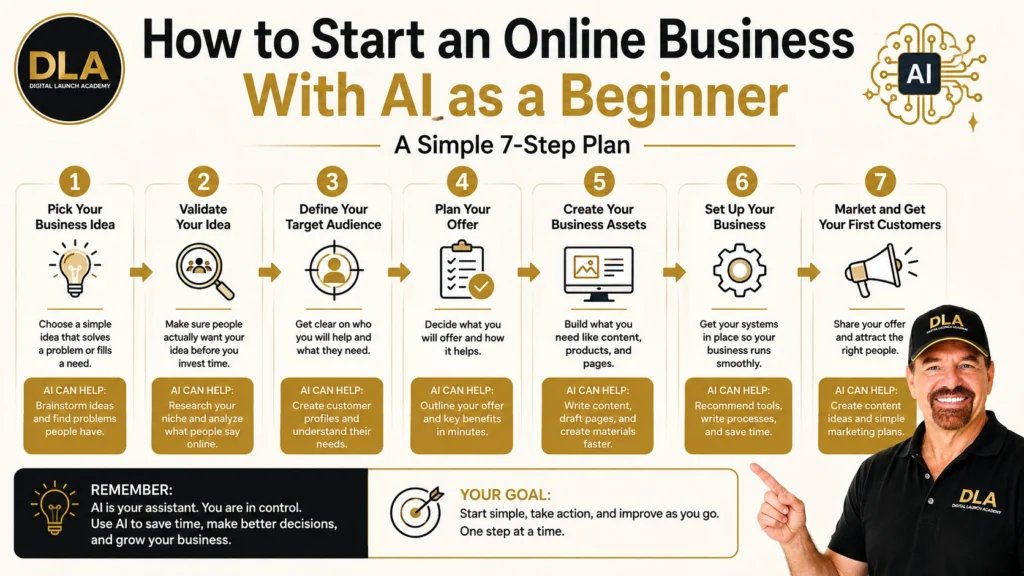
One of the biggest mistakes a beginner can make is asking AI to simply “give me a business.”
Start with a real problem, skill, experience, or interest instead.
Start With the Business Problem
Businesses usually work because they help someone solve a problem or achieve a desired result.
Begin there.
Think about problems you understand, skills you already have, or questions people regularly ask you.
You do not need the perfect idea before using AI. You need enough information to give AI some direction.
Ask AI for a Starting Point
Suppose a retiree has spent years gardening.
Instead of asking AI, “What business should I start?” the person could explain that experience and ask for common gardening problems that complete beginners struggle with and that might be helped by a simple digital resource.
AI might generate several possibilities.
Those possibilities are starting points for research. They are not automatically good business ideas.
Make the Final Decision Yourself
Look at each suggestion and ask practical questions.
Do I understand this problem?
Would I enjoy helping people with it?
Can I create something useful?
Is there evidence that people actually have this problem?
AI can help you explore possibilities, but you still decide which possibility deserves more research.
Your Action: Write one sentence describing a problem, skill, experience, or business idea you want AI to help you explore.
Once you have an idea, the next question is important: Who are you trying to help?
Use AI to Understand Your Target Customer
You cannot create a useful product or helpful marketing message if you have no idea who you are talking to.
AI can help you create a starting picture of your potential customer.
Identify Customer Problems and Questions
Tell AI what problem your product may solve and ask what questions someone experiencing that problem might have.
Look for:
- Problems.
- Goals.
- Frustrations.
- Questions.
- Concerns.
- Words customers might use to describe the situation.
This can help you think beyond the product itself and focus on the person who may need it.
Build a Starting Customer Profile
You can also ask AI to organize those ideas into a simple customer profile.
Keep it practical. You do not need a complicated document containing dozens of details.
Focus on what matters to the problem you are solving.
Verify What AI Tells You
An AI-generated customer profile is not proof that real customers think that way.
Treat it as a hypothesis that needs checking.
For example, if you are considering a meal-planning printable, ask AI for common questions a beginner might have before buying one. Then compare those suggestions with actual customer conversations, search results, reviews, or other reliable evidence.
Real customer evidence is stronger than an AI assumption.
Your Action: Ask AI to create five questions your potential customer might ask about the problem you want to solve.
Once you understand the customer better, the next step is learning what else already exists in the market.
Use AI to Research Your Market and Competitors
AI can make research feel less intimidating because it can help you decide what to investigate.
It should not replace the investigation itself.
Ask Better Research Questions
Instead of asking, “Is this a good market?” ask questions that can lead to useful research.
For example:
- What types of products already solve this problem?
- What do customers commonly complain about?
- What features appear repeatedly?
- What questions should I answer before creating my product?
- How could I make my product simpler for a beginner?
AI can help you create the questions before you start collecting answers.
Look for Patterns and Opportunities
As you gather information, AI can also help you organize it.
You may notice that several competitors solve the same problem in similar ways. You may notice common customer complaints or an opportunity to make something easier to understand.
You are looking for patterns, not a magic gap that guarantees sales.
Do Not Treat AI Research as Verified Fact
This rule is important.
Current prices, products, competitor information, statistics, and other facts may change. AI can also make mistakes.
When a fact matters to your decision, verify it directly with a reliable source.
Your Action: Create three questions you need answered about your market or competitors before making a business decision.
Once you have a clearer picture of the customer and market, AI can help turn that information into a manageable business plan.
Use AI to Plan Your Online Business
“Build an online business” is a huge goal.
A beginner may look at that goal and immediately feel overwhelmed.
AI can help break a large goal into smaller pieces.
Break a Large Business Goal Into Smaller Steps
Instead of asking for a complete business plan with dozens of steps, give AI one goal.
For example:
“I want to launch my first digital product. Break this project into five beginner-friendly stages.”
A simple sequence might include:
- Choose an idea.
- Validate the idea.
- Create the product.
- Set up the product for sale.
- Promote the product.
Now the project has a starting point.
Create a Simple Business Task List
Take one stage and break it down again.
If the current stage is product creation, you might need to decide what the product includes, create the pages, review them, test the final file, and prepare it for customers.
You do not need to work on every stage today.
Decide What to Work on First
A 50-step AI-generated business plan can create as much overwhelm as having no plan at all.
Ask AI to help you prioritize.
Then choose the next logical task and work on that task.
Your Action: Give AI one current business goal and ask it to break that goal into no more than five manageable steps.
With a manageable plan in place, AI can also help with the words and content your business needs.
Use AI to Create Business Content

Creating content can be difficult when you know what you want to say but cannot get the words onto the page.
AI can help with the starting work.
One practical way to use AI for content creation is to learn How to Write Product Descriptions With AI.
Brainstorm Content Ideas
You can provide information about your customer and ask AI for questions your content could answer.
Those questions might become:
- Blog topics.
- Video lessons.
- Email ideas.
- Social media posts.
- Product instructions.
The purpose is not to publish everything AI suggests. It is to help you find useful ideas.
Create a First Draft
AI can also help turn your notes into a first draft.
For example, give AI the facts about a digital product and ask for a simple product description written for a complete beginner.
Now you have something to edit instead of a blank page.
Edit AI Content So It Sounds Like You
Never assume the first draft is ready to publish.
Read it carefully.
Check the facts. Remove generic language. Correct product details. Simplify confusing sentences. Add your experience and examples where appropriate.
The finished content should represent you and your business—not simply whatever the AI generated.
If you want a practical project to start with, learn how to use AI for printables step by step.
Your Action: Choose one small piece of content and use AI to create a first draft. Review and change it before using it.
AI can help with visible content, but it can also help organize the work happening behind the scenes.
Use AI to Organize Your Online Business Tasks
A business becomes easier to manage when repeated tasks have a simple process.
AI can help you create those processes.
Turn Projects Into Checklists
If you complete a task regularly, explain the process to AI and ask it to organize the steps into a checklist.
A blog publishing checklist, for example, might include reviewing the article, checking links, adding images, previewing the page, and completing the final publishing checks.
Build Simple Weekly Workflows
AI can also help group tasks into a weekly workflow.
You might decide that one day is for planning, another for content, and another for checking and publishing.
The exact schedule matters less than having a system you can realistically maintain.
Keep AI From Making Your System More Complicated
If AI gives you 25 steps for a process that should take five, simplify it.
Tell the AI:
“Reduce this to the five most important steps for a complete beginner.”
A useful system should reduce confusion, not create another project to manage.
Your Action: Take one repeated business process and ask AI to organize it into a short checklist.
Once you can clearly see the tasks you repeat, you can begin finding ways to save time.
Use AI to Save Time on Repetitive Business Work
You do not need to start every task from scratch.
When you discover a process that works, save it.
Find Tasks You Repeat
Look at the work you do every week.
Maybe you repeatedly create product descriptions, organize blog ideas, prepare social posts, answer similar customer questions, or create checklists.
Those repeated tasks are good places to look for time savings.
Create Reusable Prompts and Templates
Suppose you develop an AI prompt that consistently turns your rough product notes into a useful first draft.
Save the prompt.
Next time, replace the product information instead of rebuilding the instructions.
The same idea works with templates.
Review Before You Automate
Before trying to automate a process, make sure the process actually works.
A bad process does not become better simply because it runs automatically.
First create a reliable routine. Then decide whether parts of it should be automated.
Human review should remain part of important business work.
Your Action: Save one AI prompt or instruction that worked well so you can reuse it.
At this point, it is easy to think you need a collection of specialized AI programs. Usually, that is not the best place for a beginner to start.
How to Choose AI Tools for Online Business Without Getting Overwhelmed
There are many AI tools for online business, and new options continue to appear.
You do not need all of them.
Start With One Main AI Assistant
A general-purpose AI assistant can help you learn the basic process of giving instructions, reviewing results, asking follow-up questions, and improving your work.
Learn that process before worrying about building a large collection of tools.
Add a Tool Only When You Have a Specific Need
Before adding another tool, ask:
“What problem will this tool solve that my current process does not?”
If you cannot answer that question, you probably do not need the tool yet.
Free vs. Paid AI Tools
Paid plans may provide features or capabilities that are useful for certain businesses, but paying for a tool does not automatically make it necessary.
Start with the work you need to accomplish.
If a free option handles that work adequately, it may be enough while you are learning. Consider paying when you can identify a specific feature or limitation that affects your business.
Do not build a collection of monthly AI subscriptions before you build a working business process.
Your Action: Choose one AI tool to learn first. Do not add another until you can explain what specific problem the second tool will solve.
Whichever tool you choose, learning how to give it useful instructions will make a major difference in the results.
How to Write Better AI Prompts as a Beginner
An AI prompt is simply the instruction or request you give the AI.
You do not need to become a professional “prompt engineer” to get useful results.
Tell AI What You Are Trying to Accomplish
Start with the task.
Do you want ideas?
A checklist?
A first draft?
Help organizing information?
Tell AI what you are trying to accomplish.
Give AI the Information It Needs
AI cannot automatically know what is in your head.
Give it useful context.
For example, instead of:
“Give me product ideas.”
Explain who you want to help, what problem they face, and what skills or experience you have.
Ask for the Result in a Useful Format
Tell AI how you want the answer presented.
You might ask:
“Give me five simple ideas in a numbered list. Explain each idea in two sentences using plain English.”
That makes the response easier to review.
Improve the Answer With Follow-Up Instructions
Your first answer does not have to be perfect.
You can say:
“Those ideas are too complicated. Give me five simpler options.”
Or:
“Rewrite number three for a complete beginner.”
Using AI is often a conversation. Give instructions, review the result, and then improve it.
Your Action: Take one vague prompt you have used before and improve it by adding context and a specific desired result.
Better prompts can improve the output, but even excellent prompts do not eliminate mistakes.
Common AI Mistakes Beginners Should Avoid
You do not need to be afraid of using AI. You simply need good habits.
Trusting Every AI Answer
AI can be wrong.
If the information affects money, customers, legal requirements, taxes, privacy, or another important business decision, verify it using an appropriate reliable source.
Using AI Content Without Reviewing It
Do not copy an AI-generated article, product description, email, or other content and immediately publish it.
Read it.
Check the facts.
Make sure it accurately represents your business and sounds natural.
Trying Too Many AI Tools
Tool hopping can become another form of procrastination.
Every new tool requires time to learn.
One tool that you understand and actually use can be more valuable than 10 tools you barely understand.
Sharing Information You Should Keep Private
Be careful about what you enter into any online service.
Do not casually paste private customer information, passwords, financial details, confidential business information, or other sensitive data into an AI tool.
When privacy matters, review the current policies and controls of the specific service you are using.
Expecting AI to Build the Business for You
AI can help you work.
It cannot replace the need to understand customers, create something useful, make decisions, test ideas, and improve based on real results.
The goal is not to hand your business to AI.
The goal is to use AI to make useful business work easier.
Your Action: Adopt one rule immediately: Do not publish, send, or make an important business decision from AI-generated information without reviewing it first.
With these safeguards in place, you can turn everything you have learned into a simple routine.
Create a Simple AI Workflow for Your Online Business

You now have many possible ways to use AI.
Do not try to implement all of them tomorrow.
Build one working process.
Choose One Task
Choose a task that is useful, repeated, or difficult.
Maybe you want help brainstorming weekly blog topics.
Start there.
Create and Test Your Process
Give AI clear instructions.
Review the response.
If the response is not useful, improve your instructions.
Then complete the work yourself.
You may need several attempts before you find a process that works well. That is normal.
Save What Works
Once you have a prompt, checklist, or process that consistently helps, save it.
Now you have a repeatable system.
For example, a weekly blog workflow might eventually use AI for brainstorming, outlining, first-draft assistance, editing suggestions, and creating a publishing checklist.
You would still handle factual verification and make the final editorial decisions.
Add the Next Task Slowly
Do not add five new AI processes at once.
Use the first one until it feels comfortable.
Then identify another business task that could benefit from AI assistance.
A simple workflow looks like this:
Choose one task → Give clear instructions → Review the response → Improve the instructions → Complete the work → Save what works → Add another task when ready.
Your Action: Choose one task you will use AI to help with this week and complete that process before adding another.
Before finishing, here are answers to several questions beginners commonly have about using AI in an online business.
Frequently Asked Questions About AI for Online Business
Do I need technical experience to use AI for an online business?
No. Many modern AI tools allow you to communicate using ordinary written instructions.
You do not need to understand programming or the technical systems behind AI to use it for basic business tasks.
Start with simple requests and learn through practice.
What is the best AI tool for an online business beginner?
There is no single tool that is best for every beginner and every task.
The better question is: “What do I need the tool to help me accomplish?”
A beginner will usually benefit more from learning one useful general-purpose AI assistant than constantly switching between tools.
Can AI start an online business for me?
AI can help you brainstorm, research questions, plan, organize, draft, and work through ideas.
But you are still responsible for choosing the business direction, checking information, understanding customers, creating something useful, and making decisions.
AI can assist you in building the business. It should not be treated as the business owner.
Can I use AI to write content for my business?
Yes, AI can help brainstorm, outline, and create first drafts.
But review everything before publishing it.
Check accuracy, remove generic language, make sure the information represents your business correctly, and edit the content so it sounds natural.
Is AI-generated information always accurate?
No.
AI can provide incorrect, incomplete, or outdated information.
When information matters to an important business decision, verify it with an appropriate reliable source rather than assuming the AI response is correct.
Do I need to pay for AI tools when I am starting?
Not necessarily.
Paid features can be useful, but beginners should first identify what they actually need.
Learn what you can accomplish with your current tool. Consider paying for another tool or plan when you can clearly identify the business problem or limitation the paid option will solve.
What business tasks should I use AI for first?
Start with something simple and low-risk that currently takes time or causes frustration.
Good starting points might include brainstorming ideas, organizing notes, turning a project into a checklist, or creating a first draft that you will review.
Choose one task instead of trying to change your entire business at once.
Start Using AI for Online Business One Step at a Time
You do not need to master artificial intelligence to use AI for online business effectively.
You do not need dozens of AI tools.
You do not need to automate your entire business.
Start with one useful task.
Give AI clear instructions and enough information to help you. Review the response carefully. Correct mistakes. Make the final decision yourself.
If the process saves time or makes the task easier, save what worked and use it again.
Then, when you are comfortable, add another task.
Remember the simple progression:
One tool → One task → Clear instructions → Human review → Save what works → Add another task when ready.
AI should make building and growing your online business easier to understand and manage. It should reduce unnecessary work and help you move forward—not give you another complicated system to learn.
Your Action: Choose one small business task from this article and use AI to help you complete it.
Don’t Know What to Create?

Most beginners don’t fail because they lack talent.
They fail because they’re overwhelmed by too many ideas.
Download the Free Niche Planner Checklist and discover a digital product idea you can actually build.
