If you have ever stared at a blank screen and thought, I want extra income, but I have no idea what to make, this is for you. The good news is that there are plenty of easy digital products to sell, even if you are not tech-savvy, not a designer, and not interested in building a complicated business.
I understand because I was there too. When I first started, I thought digital products had to be fancy, polished, and full of advanced features. They do not. Your first product just needs to be useful, simple, and easy for one type of person to use.
Why easy digital products to sell work so well
Simple products are easier to finish. That matters more than most beginners realize. A small product you actually complete can start bringing in money much faster than a big idea that stays stuck in your head.
Easy digital products also keep your stress low. You can make many of them with free tools like Canva, Google Docs, and basic AI help. No coding. No expensive software. No design degree.
The best part is this. People do not only buy big courses or complicated memberships. They also buy quick-win products that save time, solve a small problem, or help them stay organized.
9 easy digital products to sell as a beginner
1. Printable planners
Printable planners are one of the easiest places to start. People love tools that help them plan meals, track habits, manage bills, or organize weekly tasks.
You do not need to create a giant planner with 100 pages. Start with 5 to 10 pages around one simple topic, like:
- meal planning
- budget tracking
- daily routines
- appointment planning
- cleaning schedules
If it helps a person feel more organized, it can sell.
2. Checklists
Checklists are simple, fast to make, and very useful. Think about moments when people want a step-by-step reminder. That could be moving house, packing for a trip, preparing for a new baby, or getting ready for tax season.
A good checklist saves people mental energy. That is why they buy it.
3. Trackers
Trackers are popular because they help people stay consistent. You can create habit trackers, savings trackers, medication trackers, water trackers, or symptom trackers.
These are especially good for beginners because the layout is usually very simple. One clean page can be enough.
4. Journals
A guided journal gives people prompts so they do not have to think of what to write. This could be a gratitude journal, prayer journal, self-care journal, or goal journal.
The key is to keep the prompts clear and helpful. You are not trying to impress people. You are trying to make their day easier.
5. Templates
Templates save time. That makes them valuable. You can create Canva templates for social posts, thank-you cards, party invites, resumes, or simple business forms.
If you are worried this sounds too advanced, start with one type of template for one type of person. For example, a church event flyer template or a simple babysitter resume template. Narrow is easier.
6. Worksheets
Worksheets help people think through a problem. These work well for budgeting, goal setting, decluttering, or planning a family routine.
A worksheet is often just a few focused questions on a clean page. That is all it needs to be.
7. Simple guides
A short guide can be a great first product if you know how to do something useful. It could be a guide to starting a garden, planning a yard sale, organizing family records, or setting up a basic cleaning routine.
Do not picture a long ebook. Think 5 to 15 pages. Helpful beats long every time.
8. Prompt packs
Prompt packs are collections of ready-to-use writing prompts. These can help with journaling, prayer, social media captions, affirmations, or even simple business tasks.
This type of product is growing because people want a shortcut. They do not want to figure everything out from scratch.
9. Kids activity printables
Parents and grandparents often buy simple printables to keep children busy and learning. You can make coloring pages, alphabet practice sheets, scavenger hunts, or chore charts.
These are often fun to create and do not need a lot of pages to feel useful.
How to choose the best product idea
Do not choose the product that sounds the smartest. Choose the one that sounds the easiest to finish this week.
Step 1: Pick a small problem
Ask yourself, what do people around me often struggle with?
Good beginner examples include:
- staying organized
- remembering routines
- keeping track of money
- planning meals
- managing daily tasks
Small problems are perfect. You do not need a life-changing idea.
Step 2: Pick one person
This step helps a lot. Instead of making something for everyone, think of one person.
For example:
- a busy mom
- a retiree organizing medications
- a side hustler planning weekly goals
- a college student tracking expenses
The clearer the person, the easier the product becomes.
Step 3: Keep it tiny
This is where many beginners get stuck. They try to make too much.
Start with:
- 1 checklist
- 1 tracker
- 5 planner pages
- 10 journal prompts
- 1 short guide
Small products are not a weakness. They are how you build confidence.
If you need more help narrowing your choice, read How to Choose a Digital Product Niche for Beginners (Without Overwhelm).
How to create your first digital product
You do not need fancy tools for this. In many cases, Canva and a basic document tool are enough.
Step 1: Write down the product idea
Open a notebook or a plain document. Write one sentence:
This product helps [person] do [result].
Example:
This product helps busy adults plan simple weekly meals.
That sentence keeps you focused.
Step 2: Sketch the pages
Before you design anything, list what each page will include.
For a meal planner, that might be:
- weekly meal plan
- grocery list
- pantry inventory
- budget section
- prep notes
Now you know what you are making.
Step 3: Build it in Canva
Choose a simple template or start with a blank page. Use large text, clean spacing, and easy-to-read sections. Do not overdecorate it.
A beginner mistake is trying to make it look fancy. Clean and useful is better.
Step 4: Save it as a PDF
Most printable digital products can be saved as a PDF. That makes them easy for customers to download and use.
If your product is editable, you may also save a template version, depending on what you are selling.
Step 5: Test it yourself
Print it or use it for a day. Look for anything confusing. If a page feels cluttered or unclear, fix that before selling it.
This step matters. A simple product that works well will always beat a pretty product that feels confusing.
Free and low-stress tools to use
If technology makes you nervous, keep your tool list short.
Canva
Canva is great for planners, trackers, templates, worksheets, and printables. It is beginner-friendly and easy to learn one step at a time.
Google Docs
Google Docs works well for short guides, checklists, and prompt packs. It is simple and familiar.
Basic AI help
AI can help you brainstorm product ideas, write journal prompts, or outline a short guide. You still want to review everything and make it sound natural, but it can save time.
If you feel stuck, that is exactly where guided help and simple prompt packs can make the process feel much easier.
Common mistakes beginners make
The biggest mistake is overthinking. Many people spend weeks trying to choose the perfect idea, font, color palette, or product name. That slows everything down.
Another mistake is making a product too broad. A planner for life sounds nice, but a bill tracker for retirees is clearer and easier to sell.
Also, do not wait until you feel fully ready. Most people never reach that feeling. Confidence usually comes after you finish your first product, not before.
A simple first-week plan
If you want a no-stress way to begin, try this.
Day 1
Choose one product type and one person you want to help.
Day 2
Write out the pages or sections.
Day 3
Create the product in Canva or Google Docs.
Day 4
Edit and test it.
Day 5
Save the final file and prepare it to sell.
That is enough. You do not need to build a huge product library right away.
Once you finish your first product, follow How to Launch Your First Digital Product for the next steps.
The best easy digital products to sell are the ones you will finish
That is the truth most people need to hear. The best first product is not the most impressive one. It is the one you can make without getting overwhelmed and quit halfway through.
If you keep it simple, useful, and focused on one real problem, you are already on the right track. And if you need a gentle place to learn the steps, Digital Launch Academy was built for beginners who want a clear path without all the confusion.
Start small. Make one helpful thing. Let that be your proof that yes, you really can do this.
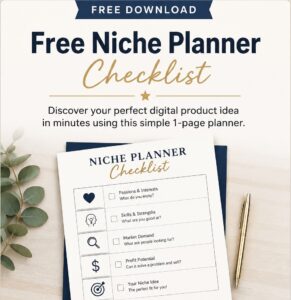
Don’t Know What to Create?
Most beginners don’t fail because they lack talent.
They fail because they’re overwhelmed by too many ideas.
Download the Free Niche Planner Checklist and discover a digital product idea you can actually build.
