Introduction
If you have ever sat down at your computer wanting to build an online business, start a blog, or create digital products, only to freeze up when staring at a blank screen, you are far from alone. For many complete beginners, putting ideas into words, organizing thoughts, or designing professional layouts can feel like an overwhelming uphill battle. Adding the phrase “artificial intelligence” into the mix can make it sound like you need an advanced technical degree or complex programming skills just to get started.
Here is the simple, reassuring truth: you do not need any coding skills, computer science background, or specialized technical knowledge to take full advantage of AI. When used correctly, ai tools for content creators act like a friendly, patient, and highly efficient assistant sitting right beside you. They help you brainstorm fresh ideas, outline your projects, organize your business workflows, and design clean, beautiful digital products in a fraction of the time it used to take.
In this comprehensive guide, you will discover how simple AI tools eliminate technical overwhelm, explore the three core tool categories every beginner needs to know, learn a step-by-step workflow for combining AI text assistants with Canva, understand how to build your toolkit for $0, and identify the common traps to avoid on your creation journey.
Why AI Tools for Content Creators Are a Game-Changer for Beginners
Starting an online creation journey historically required wearing dozens of different hats simultaneously: researcher, writer, editor, graphic designer, layout specialist, and business strategist. For anyone balancing family life, managing a full-time job, or launching an online presence later in life, acquiring and mastering all of those distinct skill sets from scratch can quickly lead to mental exhaustion and project burnout.
This structural challenge is precisely why ai tools for content creators have transformed the online landscape for beginners. AI does not exist to replace your personal story, unique human voice, or authentic life experiences. Instead, it manages the tedious, time-consuming foundational tasks that typically stall momentum before a project ever gets off the ground.
Beginner Reassurance: You do not need to understand how artificial intelligence works under the hood, nor do you need any prior technical experience. If you know how to type a basic sentence into a search box or send a standard email, you already possess all the technical skill required to use AI tools with complete confidence.
Want to learn about specific AI tools? Read 7 Top Beginner Friendly AI Tools to Try First.
The Primary Benefits of AI for Beginner Content Creators
- Eliminates Blank-Page Syndrome: Staring at an empty document trying to decide what to write is one of the biggest momentum killers for new creators. AI text assistants provide immediate topic ideas, structured article outlines, and preliminary drafts, giving you a tangible foundation to edit and refine rather than starting from absolute zero.
- Saves Hundreds of Hours of Manual Labor: Complex structural tasks that traditionally required days of work—such as outlining a comprehensive 10-page workbook, categorizing research, or drafting a month of content ideas—can now be generated and organized in a matter of minutes.
- Radically Lowers the Technical and Financial Barrier: Expensive design suites, complicated software installations, and hiring costly freelancers are no longer prerequisites for creating high-quality, professional assets. Modern AI-powered tools provide intuitive interfaces that yield polished results without technical frustration.
- Accelerates the Learning Curve: Instead of spending months taking courses on visual hierarchy, copy structuring, or document layout, beginner-friendly tools allow you to learn by doing, giving you instant feedback and clear examples to follow.
Once you realize that AI functions as a supportive assistant built specifically to remove friction and overwhelm, the next logical step is understanding which specific tools deserve your focus.
3 Essential Types of AI Tools Every Beginner Needs
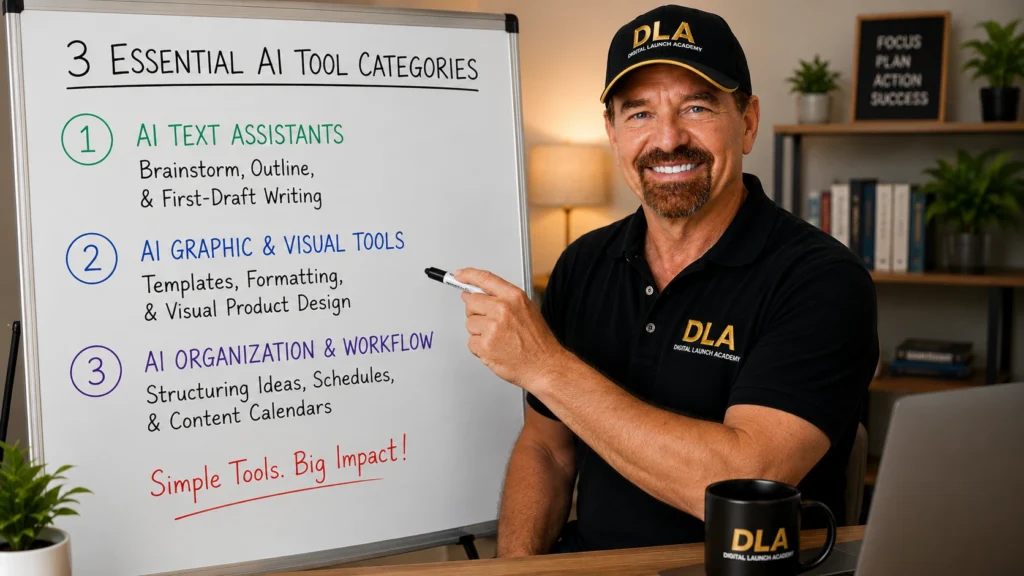
With thousands of new software applications and specialized tools launching every month, it is remarkably easy for beginners to suffer from information overload. You do not need dozens of complicated software subscriptions or elaborate tech setups to succeed. In fact, virtually every task in digital content creation and product publishing can be grouped into three primary tool categories.
| BEGINNER AI TOOLKIT CATEGORIES |
| 1. AI Text Assistants | Brainstorming, Outlining, | & First-Draft Writing |
| 2. AI Graphic & Visual Tools | Templates, Formatting, | Visual Product Design |
| 3. AI Organization & Workflow | Structuring Ideas, Schedules, | Content Calendars
Pacing Advice for Beginners: Do not attempt to sign up for or learn all three categories in a single day. Focus on mastering one simple text assistant first to get comfortable with prompting, then layer in visual formatting and workflow organization as your confidence grows. Taking small, sequential steps prevents tech paralysis.
1. AI Text Assistants (Brainstorming & Drafting)
AI text assistants specialize in processing, structuring, and generating written language. They serve as your personal brainstorming partner, research compiler, and drafting assistant. Whether you are generating ideas for a new digital guide, writing blog posts, or structuring checklist items, text assistants handle the initial heavy lifting.
Key Capabilities:
- Generating lists of targeted digital product topics based on specific audience needs.
- Turning broad ideas into detailed, step-by-step article outlines.
- Rephrasing existing draft text to improve clarity, tone, and readability.
Practical Prompt Example:
To get the best results from a text assistant, avoid vague questions. Always provide a clear role, a specific context, and a defined goal.
Beginner Prompt Structure: “Act as an expert instructor for beginners in online business. Generate a list of 5 simple, printable checklist ideas that help busy parents organize their weekly household meal planning. Focus on ideas that are practical, easy to read, and quick to implement.”
2. AI Graphic & Visual Tools (Canva + AI)
Once your text assistant helps you write and refine your written content, you need a visual tool to package that information into a attractive, professional asset that people can read, print, or download. This is where design platforms like Canva excel.
Canva seamlessly integrates simple AI capabilities directly into a drag-and-drop design canvas. Features like automatic text layout, magic writing tools, background removal, and smart image resizing allow complete beginners to import written content into pre-designed templates effortlessly.
Key Capabilities:
- Converting plain text outlines into professionally formatted multi-page PDFs, planners, or workbooks.
- Customizing color palettes, font pairings, and graphical elements with single-click precision.
- Producing consistent visual branding across all your digital materials without design experience.
3. AI Organization & Workflow Tools
Creating digital assets consistently requires keeping your research, schedules, and project ideas neatly organized. Workflow and organization tools prevent digital clutter and keep your project steps clear.
Key Capabilities:
- Organizing raw ideas and topic categories into structured content calendars.
- Breaking large, intimidating projects (like launching a digital store) into manageable daily action lists.
- Storing reusable prompt templates and asset outlines in an easily accessible workspace.
Now that you understand the three core tool categories that form a beginner’s foundation, you might naturally wonder: how do these individual tools actually connect to turn an abstract idea into a finished, sellable product?
If you’re just getting started, discover 7 AI Tools for Beginner Sellers That Save Time and see which tools can make your first digital product easier to create.
How to Combine Canva and AI to Create Your First Digital Product
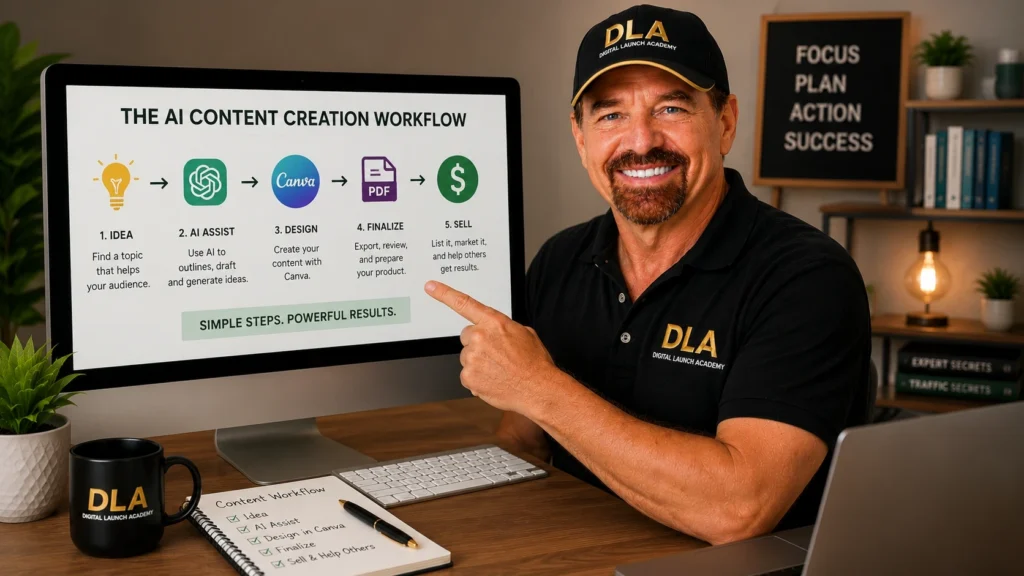
The secret to creating digital products efficiently as a beginner is establishing a smooth, repeatable workflow. By pairing an AI text assistant with Canva’s visual templates, you can transform an initial concept into a finished, print-ready digital asset in a single afternoon.
+------------------+      +-------------------+      +--------------------+
|  1. AI PROMPT    | ---> |  2. TEXT OUTLINE  | ---> |  3. CANVA TEMPLATE |
| (Generate Ideas) |      | (Refine Content)  |      | (Format & Download)|
+------------------+      +-------------------+      +--------------------+
Step 1: Generate Raw Content and Outlines with AI
Your creation process begins inside your AI text assistant. Instead of staring at an empty page trying to write every sentence from memory, use targeted prompts to build your initial foundation.
- Define Your Product: Specify the exact format (e.g., a 3-page printable guide, a daily habit tracker, or an event planning checklist).
- Request Detailed Sections: Ask the AI to provide step-by-step bullet points, actionable tips, or category headers for each section of your product.
- Refine the Structure: Ask the tool to shorten lengthy paragraphs into scannable lists, ensuring the text remains easy for readers to digest.
Step 2: Review, Fact-Check, and Personalize
Never publish unedited AI output. The true value of your digital product comes from your personal touch, human judgment, and authentic perspective.
- Inject Your Personal Voice: Rephrase generic sentences to sound natural and aligned with how you speak. Add personal anecdotes, real-life examples, or lessons learned from your own experience.
- Verify Accuracy: Check all steps, lists, and instructions to confirm that every piece of advice is accurate, safe, and genuinely helpful.
- Ensure Clarity: Remove unnecessary jargon, wordy phrasing, or repetitive sentences to keep the content concise and beginner-friendly.
Step 3: Format, Package, and Export in Canva
With your written content finalized, open Canva to transform your plain text into a visual, professional digital product.
- Select a Template: Use Canva’s search bar to find pre-made templates designed specifically for your product type (search terms like “Checklist Printable,” “Planner Workbook,” or “Ebook Layout”).
- Transfer Your Content: Paste your finalized text into the designated text blocks within the template.
- Customize Design Elements: Adjust the template’s color scheme to match your brand style, select clean and legible fonts, and insert simple visual accents or icons where appropriate.
- Export Your File: Once layout and alignment look crisp, export the finished document as a high-quality PDF ready for printing or instant download by your customers.

Free vs. Paid AI Tools: What Do You Actually Need to Get Started?
A very common worry among beginners entering the online creation space is that building a digital product business requires an expensive monthly software budget. Fortunately, nearly every major AI platform operates on a freemium model, offering robust free tiers specifically designed for casual creators and beginners.
| Tool Category | Free Tier Capabilities | When to Consider Upgrading (Paid) |
| AI Text Assistants | Access to core language models (e.g., ChatGPT free tier) for unlimited brainstorming, drafting, and text editing. | When you require faster processing speeds during peak hours or advanced data analysis capabilities. |
| Visual Design (Canva) | Access to thousands of free layout templates, standard fonts, basic graphics, and core design controls. | When you want access to premium stock media libraries, brand kit storage, and advanced magic design tools. |
| Organization Tools | Free document workspaces, basic task management boards, and simple project lists. | When managing multi-member teams, complex automated workflows, or large cloud storage requirements. |
Practical Budget Advice for Complete Beginners
You can comfortably brainstorm, write, design, and publish your very first digital product spending $0 on software subscriptions. Free tiers provide more than enough functionality to learn the tools, refine your workflow, and launch your initial asset line.
A good rule of thumb is to remain on free tiers until your digital creation efforts generate consistent income. Once your business earns revenue, you can selectively upgrade to paid features that save additional time or enhance your workflow efficiency.
5 Common AI Mistakes Beginners Should Avoid
As you begin integrating AI tools into your daily creation routine, keeping a few critical best practices in mind will protect your brand reputation, save valuable time, and ensure your final products remain top quality.
1. Publishing Raw, Unedited AI Output
Raw AI text often suffers from repetitive sentence structures, overly formal language, and a lack of emotional resonance. Publishing unedited AI output makes your content feel robotic and impersonal. Always review, edit, and infuse your unique voice into every piece of content you produce.
2. Skipping Essential Fact-Checking
AI language models operate by predicting logical word patterns rather than consulting an internal database of truth. As a result, they can occasionally state incorrect information, inaccurate statistics, or flawed instructions with complete confidence. Always double-check facts, links, and technical details before releasing a product to the public.
3. Overcomplicating Your Prompts
Many beginners get tricked into believing they must memorize complex “prompt engineering” codes or multi-page instruction scripts to get good results. In reality, clear, direct conversational language works best. Speak to your AI tool as if you were instructing an intelligent human assistant who needs clear context and simple directions.
4. Falling into “Tool Hoarding” and Tech Paralysis
Signing up for dozens of new software tools, browser extensions, and app trials creates massive cognitive overwhelm and distracts from actual creation. Choose one reliable text assistant and Canva, and commit to mastering them before exploring additional software. Simplicity builds momentum.
5. Forgetting Your Unique Human Value
Your audience does not buy digital products simply for raw information—information is freely available everywhere online. They buy because they trust your curated perspective, your relatable experiences, and your step-by-step guidance. AI provides the structure and speed, but your unique human insight provides the real value.
Frequently Asked Questions About AI Tools for Content Creators
Do I need any technical background or coding skills to use AI tools?
No. Modern AI tools are built with natural language interfaces, meaning you interact with them using everyday conversational language. If you know how to type a simple query into Google or send a text message, you possess all the technical skill required to use AI tools effectively.
Are AI tools expensive for beginners starting out?
Not at all. Leading AI text assistants and design platforms like Canva offer robust free tiers that require no credit card to start. You can research, write, format, and publish your first digital product entirely for $0 in software costs.
Is content created with AI assistance legal and safe to sell?
Yes. Content that you generate, customize, edit, and package into unique final assets (such as printables, workbooks, guides, or planners) can be legally sold in your online store. The key is ensuring your final product provides genuine value, uses original formatting, and includes your personal review and edits.
Will AI replace my own original ideas and creativity?
No. AI acts strictly as an assistant, not a substitute for human creativity. It excels at eliminating blank-page syndrome, organizing scattered ideas, and speeding up repetitive design tasks, but your personal insights, real-life stories, and unique voice remain the core reasons customers buy from you.

Conclusion
Navigating the world of online business and content creation as a beginner does not have to be an overwhelming, expensive, or technically intimidating experience. Integrating ai tools for content creators into your workflow transforms the creation process from a frustrating struggle into a manageable, step-by-step experience.
Throughout this guide, we explored how AI text assistants eliminate blank-page paralysis by providing instant outlines and initial drafts. We broke down the three essential tool categories—text assistants, visual design platforms like Canva, and workflow organization tools—showing how each plays a distinct role in your tech stack. We also mapped out a practical 3-step creation workflow that turns raw ideas into polished digital products, confirmed that complete beginners can launch assets for $0 using free software tiers, and identified the key mistakes to avoid along the way.
Ultimately, artificial intelligence is here to support your creative journey, eliminate tech friction, and help you turn your knowledge into meaningful digital products. By taking things one simple step at a time, using free tools, and keeping your unique human voice at the center of everything you publish, you have everything you need to build and launch with complete confidence. The next step may be here: Digital Products for Beginners: The Ultimate Guide to What to Create and Sell Online