
Running an online business can start out simple. Then, little by little, you add products, blog posts, customer emails, files, marketing tasks, and dozens of small things you need to remember.
Before long, you may feel like you are doing the same work over and over while still wondering what you forgot.
That is where business systems and automation can help.
The words may sound technical, but the basic idea is simple. A business system is a repeatable way of getting something done. Automation uses technology to complete certain repetitive steps for you.
You do not need complicated software or a fully automated business to get started. In fact, one of the best business systems for a complete beginner can be nothing more than a checklist.
The goal is not to automate everything. The goal is to make your business easier to organize and manage, one simple process at a time.
What Are Business Systems and Automation?

Before thinking about software or automation tools, it helps to understand what these two terms actually mean.
They work together, but they are not the same thing.
What Is a Business System?
A business system is a repeatable process you follow to complete a particular task.
Suppose you publish blog articles. Each time you publish one, you might:
- Review the finished article.
- Add the article to your website.
- Add images.
- Check the links.
- Complete your SEO settings.
- Preview the article.
- Publish it.
When you follow those steps in the same order each time, you have created a business system.
It does not have to be complicated. You could keep those seven steps on a printed checklist beside your computer.
What Is Business Automation?
Business automation is when technology completes part or all of a repetitive task with less manual work from you.
For example, imagine someone purchases one of your digital products.
Instead of you personally sending the customer the same confirmation message every time someone buys, your selling platform may be able to send it automatically.
That is automation.
The Difference Between a System and an Automation
The easiest way to remember the difference is this:
The system determines how the work gets done. Automation allows technology to perform certain steps within that system.
You can have a system without automation.
A checklist is a system. A written weekly schedule can be a system. A folder structure for organizing your digital products can be a system.
This distinction is important because beginners sometimes start by searching for automation software when they have not yet decided what their process should be.
Start with the process. Technology comes later.
Your Action: Write down one business task you perform more than once.
Once you can recognize a basic business system, the next question is why creating one is worth your time.
Why Simple Business Systems Matter for Beginners

When you are running a small online business by yourself, it can seem unnecessary to create formal systems.
You may think, “I know what I need to do. Why write it down?”
The problem comes when you have ten, twenty, or fifty different things to remember.
Simple systems take some of that pressure off your memory.
Systems Help You Remember What Comes Next
A repeatable system gives you a clear starting point and a clear next step.
Instead of sitting down at your computer and trying to remember everything required to publish a product, you can open your checklist and begin with Step 1.
That helps reduce forgotten tasks.
For example, a digital product launch might require you to check the product file, review the product page, test the checkout, and confirm that the customer receives the correct product.
A checklist helps you complete those steps consistently.
Systems Reduce Repetitive Decision-Making
Without a system, you may repeatedly ask yourself:
What do I do next?
Where did I save that?
Did I already do this?
What am I forgetting?
Those small decisions take time and mental energy.
A system allows you to make many of those decisions once. The next time you perform the task, you follow the process you already created.
Systems Make Your Business Easier to Manage
Systems also create consistency.
You are less dependent on remembering everything correctly every time. Your work becomes more predictable because you know what needs to happen and in what order.
That does not mean your small business needs to operate like a large corporation.
The purpose is much simpler: make recurring work easier to manage.
Your Action: Identify one recurring task where you sometimes forget a step or wonder what to do next.
Now you can begin looking for other repeated tasks that may benefit from the same approach.
Start by Finding the Tasks You Repeat
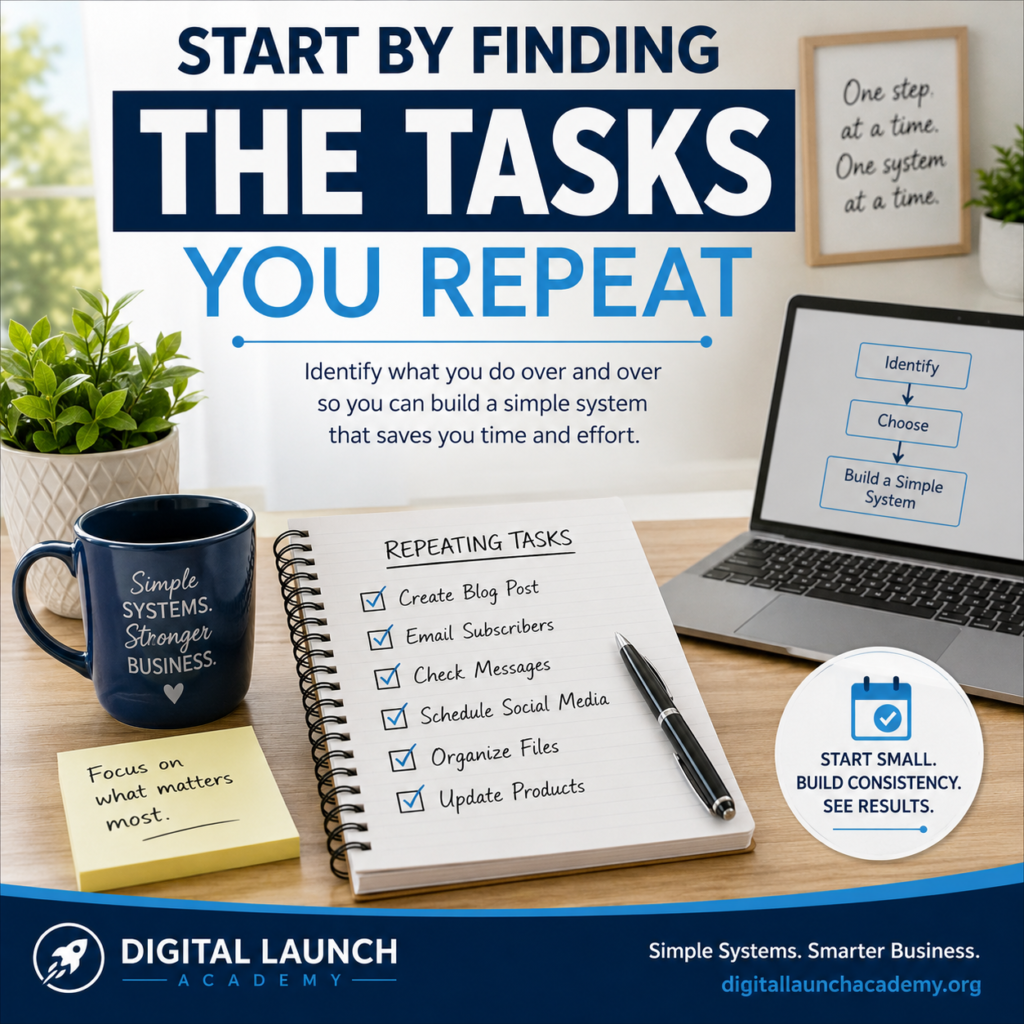
You do not need to map every process in your business.
Start by noticing repetition.
If you repeatedly perform the same task, there may be an opportunity to create a system for it.
Daily Tasks
Look at what you do on a typical workday.
You might:
- Check customer messages.
- Review orders.
- Work on content.
- Update a digital product.
- Organize files.
If your digital product files are getting hard to find, How to Organize Digital Product Files and Folders shows you a simple way to organize folders, file names, working files, and finished products.
You do not need a system for every small activity. You are simply looking for tasks that happen frequently enough that having a standard process could help.
Weekly Tasks
Weekly activities are often good candidates for systems because they are easy to forget when you are busy.
Perhaps every week you review your blog, prepare new content, answer customer questions, check sales, or plan what you will work on next.
A simple weekly checklist can prevent you from starting each week from scratch.
One of the easiest systems to build first is a consistent weekly routine. Follow this step-by-step guide to create a simple online business weekly workflow that helps you organize your tasks and make steady progress.
Tasks Triggered by an Event
Some tasks do not happen on a schedule. Instead, something happens that starts the process.
A customer purchases a product.
You publish a blog post.
You create a new digital product.
You receive a support request.
Each of these events may require you to perform the same series of steps.
Those are excellent places to look for repeatable systems.
Your Action: Write down three business tasks you repeat regularly and circle the one that causes the most confusion or wasted time.
That task can become your first simple business system.
How to Create Your First Simple Business System
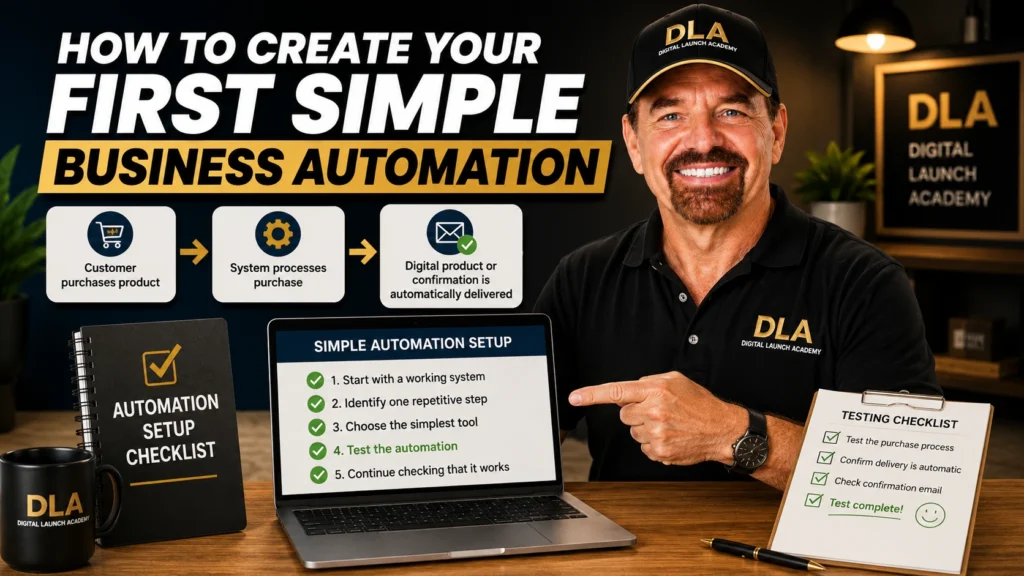
You have identified a repetitive task. Now you can turn it into a process you can follow.
Keep your first system simple.
Step 1 – Choose One Repetitive Task
Use the task you circled in the previous section.
Do not choose five tasks.
Starting with one allows you to learn how systems work without creating another overwhelming project.
Step 2 – Write Down What You Currently Do
Perform the task in your mind from beginning to end.
What do you do first?
What happens next?
Continue writing down the steps until the task is complete.
Do not worry about making it perfect. You are documenting what you actually do now.
Step 3 – Put the Steps in the Right Order
Review what you wrote.
Would someone following these instructions know what to do first, second, and third?
Move the steps into a logical order.
For example, a simple blog publishing process might be:
- Review the article.
- Add it to the website.
- Add the images.
- Check the links.
- Complete the SEO fields.
- Preview the page.
- Publish.
Step 4 – Turn the Steps Into a Simple Checklist
Now make the process easy to use.
Your checklist can be printed, kept in a notebook, or stored digitally. The format matters less than whether you will actually use it.
Avoid adding steps just because they make your system look more professional.
Include what you need to complete the task correctly.
Step 5 – Test and Improve the System
Use your checklist the next time you perform the task.
You may discover that a step is missing. Another step may be unnecessary. Two steps may work better in a different order.
That is normal.
Your first system does not need to be perfect. It needs to be useful.
Your Action: Create a checklist for the one recurring task you selected in the previous section.
Once you know how to create one simple system, you can use the same approach in other parts of your business.
Business Systems Every Beginner Can Build
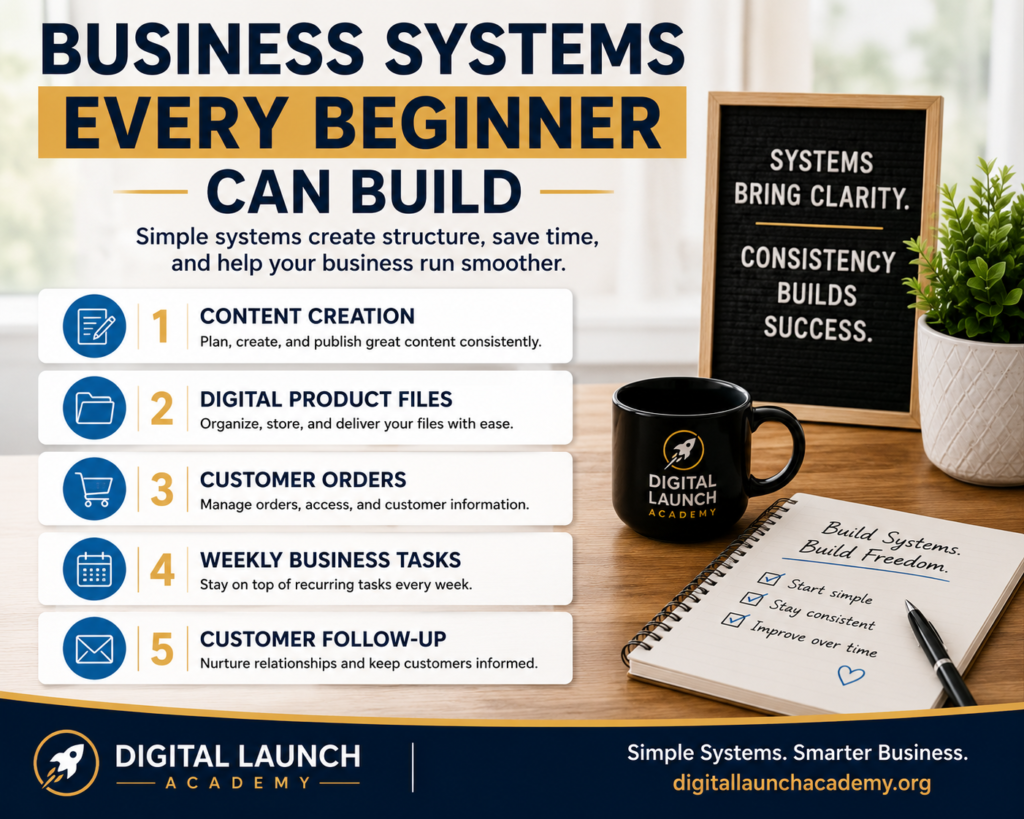
There are many places where systems can help an online business, but you do not need to build all of these at once.
Think of these as possibilities.
Content Creation System
If you create blog posts, videos, emails, or social content, a content system can help you follow the same basic process each time.
For example:
Idea → Draft → Review → Prepare → Publish.
Your exact process may be different. What matters is that you have a repeatable path from an idea to finished content.
Digital Product File System
Digital businesses can accumulate files quickly.
You may have drafts, finished PDFs, images, product descriptions, promotional graphics, and older versions of products.
A file system determines where each type of file belongs and how you name it.
The benefit is simple: when you need a file six months from now, you know where to look.
Customer Order System
Think about what should happen when someone purchases your product.
The order may need to be processed, the customer needs access to the correct product, and you may need a record of the transaction.
Writing down that process helps you see what happens at each stage.
Weekly Business Workflow
A weekly workflow helps you decide when recurring work gets done.
For example, you may have certain days for creating content, updating products, checking business numbers, or handling administrative tasks.
The purpose is not to schedule every minute. It is to give recurring work a predictable place in your week.
Customer Follow-Up System
Customer questions and follow-ups can also benefit from a simple process.
You might decide where customer messages arrive, how often you check them, how you record problems that need additional attention, and how you confirm that an issue has been resolved.
Again, you do not need to build all five systems today.
Your Action: Choose one additional area from this section that would make your business easier to manage. Write it down for later rather than building it immediately.
Once you have a working process, you can begin asking whether part of it should be automated.
What Should You Automate in Your Business?

Automation can save time, but only when you use it for the right tasks.
A good question is not, “What can I automate?”
A better question is, “What repetitive part of my existing system would be easier if technology handled it?”
Automate Repetitive Tasks
Good automation candidates are usually repetitive, predictable, and based on clear rules.
For example, delivering the same purchased digital file to each customer is predictable.
The customer completes the purchase. The correct product needs to be delivered.
That makes it a strong candidate for automation.
Other repetitive tasks may also qualify, but each automation should solve a real problem.
Keep Important Decisions Human
Not every business activity should be automated.
Important decisions, unusual customer situations, quality control, and personal interactions may require human judgment.
Technology can assist you, but that does not mean you should remove yourself from every process.
This is especially important when the situation does not follow a predictable pattern.
Do Not Automate a Broken Process
This may be the most important rule in this entire article:
Create a working process before you automate it.
If you do not understand the process, automating it can make the problem harder to find and fix.
Automation should improve a process you understand. It should not be used to hide confusion.
Your Action: Look at the system you created earlier and mark one repetitive step that might eventually be automated.
Now you can look at how to approach that first automation without rebuilding your entire business.
Once you have a few basic business systems in place, the next step is learning how to automate repetitive tasks so you can save time without making your business more complicated.
How to Create Your First Simple Business Automation
Your first automation should be small enough that you understand what it does and can test whether it works.
You do not need several connected applications or a complicated technical setup.
Step 1 – Start With a Working System
Use a process that you already understand.
You should know what starts the process, what steps need to happen, and what the correct result should be.
That gives you something reliable to test against.
Step 2 – Find One Repetitive Step
Look for a step you perform the same way repeatedly.
For example, after a customer purchases a digital product, perhaps the same confirmation or delivery message needs to be sent each time.
That is much easier to evaluate than trying to automate your entire customer experience at once.
Learn more about how to automate repetitive tasks in this retail article.
Step 3 – Choose the Simplest Appropriate Tool
Before buying another program, look at the tools you already use.
Your website, email platform, checkout system, or other business software may already contain the automation you need.
A new tool creates something else you have to learn and manage. Add one only when there is a clear reason.
Step 4 – Test the Automation
Never assume an automation works simply because you turned it on.
Test the complete process yourself.
If the automation involves a customer receiving something, test what the customer actually receives.
Check the message, file, timing, and destination.
Step 5 – Check It Regularly
Automation reduces manual work. It does not eliminate responsibility.
Software settings can change. Connections can fail. Your business process can change.
Periodically check important automations to make sure they are still producing the result you expect.
Your Action: Choose only one repetitive step to investigate for automation. Do not automate additional processes until the first one has been tested successfully.
Before adding more automation, it helps to recognize a few mistakes that can turn a simple system into something harder to manage.
Common Business Systems and Automation Mistakes
Systems should reduce confusion.
If your new system creates more confusion than the old way of working, something needs to change.
Trying to Automate Everything
A fully automated business may sound appealing, but automation itself requires setup, testing, and maintenance.
Automate where there is a clear benefit.
Manual work is not automatically bad.
Using Too Many Tools
It is easy to collect software.
One application handles email. Another manages tasks. Another connects applications. Another stores information.
Soon you are managing the tools instead of managing the business.
Whenever possible, use what you already have before adding something new.
Building Complicated Systems Too Early
A beginner does not need the same systems as a company with fifty employees.
Build for the business you have now.
A one-page checklist that you actually follow is more useful than a complicated workflow you do not understand.
Failing to Test Your Automations
An automation is only helpful if it produces the correct result.
Test it before depending on it.
Then check it periodically.
This is particularly important for processes that affect customers, purchases, product access, or important business information.
Never Updating Your Systems
Your business will change.
A checklist that worked six months ago may contain a step you no longer need. You may have added a new tool or changed the way you create products.
Your systems should change when the business changes.
Consider the difference between using four connected applications for a task and completing the same job with one checklist and a feature already available in software you use.
The more complicated option is not automatically better.
Your Action: Review your first system and remove any step, tool, or planned automation that does not clearly make the process easier or more reliable.
The final step is making systems part of how you gradually build your business rather than treating automation as one giant project.
Build Your Business Systems One Step at a Time
You do not need to finish setting up your entire business before you can make progress.
Start with the process that will help you most right now.
Start With One System
Choose one recurring problem.
Build one system for it.
Use that system until you understand what works and what needs to change.
Then move to another area.
This keeps you focused on solving actual problems instead of creating systems simply because you think a business is supposed to have them.
Improve What Already Works
A business system is not something you create once and never touch again.
As you use it, you will notice ways to improve it.
You may remove a step, change the order, make an instruction clearer, or discover a faster way to complete part of the process.
Small improvements add up.
Add Automation Only When It Saves Time or Reduces Repetition
Automation should have a purpose.
Perhaps you begin with a weekly workflow. Later, you create a checklist for publishing content. After using that checklist repeatedly, you notice one predictable step that technology can reliably handle for you.
That is a natural progression.
System first. Automation second.
You do not need a fully automated business. A few dependable systems that you understand can make a significant difference in how organized and confident you feel.
Your Action: Choose the one business system you will create or improve first. Complete and use that system before starting another.
Frequently Asked Questions About Business Systems and Automation
What is a business system?
A business system is a repeatable process for completing a task.
For example, if you follow the same checklist every time you publish a blog post, that checklist is part of your business system.
A system does not have to involve special software.
What is the difference between a business system and automation?
A business system defines how a task gets done.
Automation allows technology to complete certain repeatable steps within that process with less manual work.
You can have a business system without automation. In many cases, beginners should create and understand the system before deciding whether any part of it needs to be automated.
What business systems should a beginner create first?
Start with the recurring task that causes the most confusion, wasted time, or forgotten steps.
That might be publishing content, organizing product files, handling customer orders, planning weekly work, or another repetitive part of your business.
Do not try to create every system at once.
Do I need expensive software to automate my business?
Not necessarily.
The tools you already use may include automation features that can handle your first needs.
Before purchasing additional software, identify the exact task you want to automate and check whether your current tools can already handle it.
Buy or add technology because it solves a specific problem, not simply because automation sounds useful.
What should I automate first in my online business?
Look for a task that is repetitive, predictable, low-risk, and part of a process that already works.
Automatic delivery of a purchased digital product is a good example because the desired result is clear and repeatable.
Avoid beginning with processes that require significant personal judgment or change frequently.
Can a very small online business benefit from systems?
Yes.
A one-person business can benefit greatly from simple systems because one person may be responsible for content, products, customer service, marketing, files, and many other tasks.
A repeatable process reduces how much you have to remember and helps you complete recurring work more consistently.
Conclusion
Business systems and automation do not have to begin with complicated software.
They can begin with a piece of paper and a checklist.
Start by identifying something you do repeatedly. Write down the steps. Put them in order. Follow the process and improve it as you learn.
Once the process works, look for repetitive steps where automation would genuinely save time or reduce unnecessary work.
Remember the basic approach:
Start small. Build the process before automating it. Solve one recurring problem at a time. Keep your systems simple. Test automation before depending on it. Improve your systems as your business grows.
You do not need to automate your entire business.
Complete the first system you chose. Use it. Improve it.
Then, when you are ready, move on to the next one.
Don’t Know What to Create?

Most beginners don’t fail because they lack talent.
They fail because they’re overwhelmed by too many ideas.
Download the Free Niche Planner Checklist and discover a digital product idea you can actually build.
